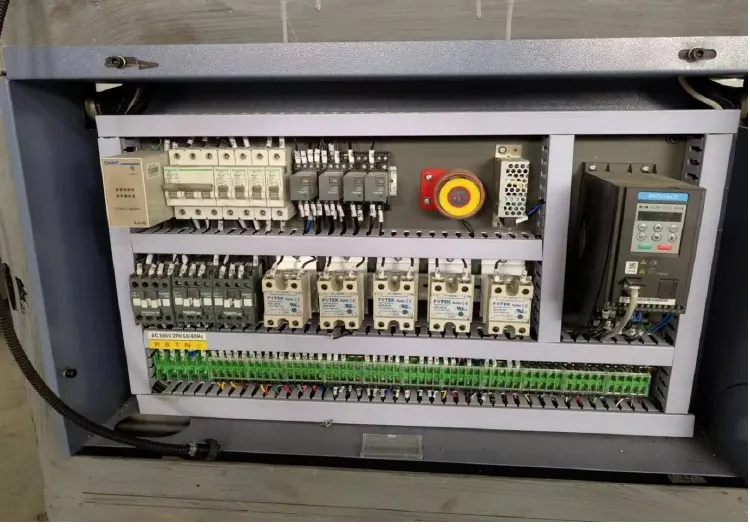
Paper cup machine control cabinet cooling and filter maintenance protects drives, power supplies, controllers and terminals from an operating environment they were not designed to tolerate. A clogged inlet, failed fan, blocked outlet or open cabinet door can change internal temperature and contamination patterns before a clear alarm appears. The right response is to verify the thermal path and its cause, not to aim an unapproved fan into an energized enclosure.
Recognize a thermal-management symptom
Useful signs include heat-related drive alarms, resets after a long run, a fan that does not start, unusually hot exhaust, dust trails around door gaps, repeated component faults in one cabinet zone or a problem that changes with room temperature. Record the first alarm, production state, ambient condition and how long the machine had operated.
The broader electrical control cabinet inspection guide covers terminals, wiring and general condition. This guide focuses on air movement, heat rejection, contamination control and the evidence needed before replacing an electrical component.
Understand the delivered cooling arrangement
From the machine manual and cabinet drawings, identify inlet filters, outlet grilles, circulation fans, heat exchangers or cabinet cooling units included in the actual configuration. Note airflow direction, fan power source, temperature control, alarm devices and required clearances. Do not assume every grille is an inlet or that all fans run continuously.
Check the cabinet rating and operating-environment requirements documented by the supplier. Leaving a door open can bypass the intended filter path and draw paper dust, coating particles or humid air across electronics. Adding holes or changing a fan can also upset cabinet pressure and protection.
Build a cooling evidence table
| Observed pattern | Evidence to collect | Diagnostic direction |
|---|---|---|
| Alarm after extended production | First alarm, runtime, load state, ambient condition and fan status | Compare heat buildup with cooling operation and drive load |
| Filter dark or loaded unevenly | Filter identity, installation direction, maintenance date and dust source | Review service interval, sealing and room contamination |
| Little air at one grille | Inlet and outlet blockage, fan state and internal obstruction | Trace the complete path instead of changing one vent |
| Dust inside despite clean filter | Door seals, cable entries, unused openings and cabinet pressure path | Locate bypass leakage or incorrect filter fit |
| One zone runs hotter | Component location, circulation, nearby heat sources and load history | Separate airflow distribution from electrical overload |
Inspect externally before opening the enclosure
With the machine in the permitted state, inspect external grilles, fan sound, airflow indicators and door condition without placing fingers or objects into openings. Confirm that stored materials, walls or temporary covers do not block the required clearance. Photograph contamination and filter condition before removal.
If a fan has stopped or an alarm is present, do not open an energized cabinet unless the work is performed by qualified electrical personnel using the required protective procedure. Apply isolation and verify absence of voltage before internal cleaning or physical inspection according to site rules.
Service filters and fans without spreading contamination
Use the specified replacement filter or approved cleaning method. Record orientation, fit and sealing. Do not blow collected dust deeper into electronics with uncontrolled compressed air. Inspect fan blades, guards, connectors, mounts and signs of stalled rotation or bearing wear. Replace a fan only with a confirmed compatible part.
Clean the surrounding work area and address the dust source where practical. A filter that loads rapidly may be telling you about paper trimming, open cartons, compressed-air cleaning or room ventilation rather than a cabinet defect. Maintenance intervals should follow observed condition and the supplier’s requirements, not a fixed value copied from another factory.
Separate cooling failure from electrical load
A hot drive or power supply can result from abnormal load, loose connection, voltage imbalance or repeated acceleration as well as poor cooling. Qualified personnel should compare component diagnostics, phase conditions, drive history and cabinet temperature evidence with the electrical drawings.
Use the power quality and voltage imbalance guide when several electrical devices behave abnormally. Do not mask an overload by lowering an alarm threshold, fitting an oversized fan or operating with the door open.
Verify restoration under representative operation
After service, confirm all tools are removed, covers and doors are secured, filters are correctly installed and cable entries remain sealed. Use the approved restart sequence. Record fan state and repeat the same external observations at controlled operating stages.
Monitor the alarm history and the component or cabinet temperature at repeatable locations using the approved method. Release the machine only when the airflow path, electrical condition and product operation remain stable for the defined confirmation run.
Frequently asked questions
Can the cabinet door be left open to keep the drives cooler?
No as a routine solution. It can defeat filtered airflow, expose energized parts and draw dust or moisture into the enclosure. Diagnose and restore the designed cooling path.
Should a dirty filter always be cleaned with compressed air?
Only if the supplier approves that method and contamination can be controlled safely. Many filters should be replaced, and uncontrolled air can drive dust into sensitive equipment.
Does a high-temperature drive alarm prove the fan failed?
No. Cooling restriction is one possibility, but motor load, supply quality, acceleration pattern, drive condition and ambient temperature also matter. Preserve the first event and operating context.
What information should be sent for supplier review?
Provide the machine and cabinet identification, first alarm, ambient condition, runtime, filter and fan photographs, maintenance history, electrical diagnostics from qualified personnel and recent configuration changes.
Send the machine model, cabinet location, alarm history, ambient condition, filter and fan evidence and qualified electrical findings through our inquiry page. HANNAI can compare them with the delivered cooling and electrical configuration.