A paper cup machine HMI recipe backup is useful only when the factory can identify what was saved, which machine and product it belongs to, and how it may be restored safely. An unexplained screenshot or an old USB copy is not a recovery system. Good control connects the approved cup, material, tooling, software revision, parameter set and verification sample so that a lost setting does not become an uncontrolled production experiment.
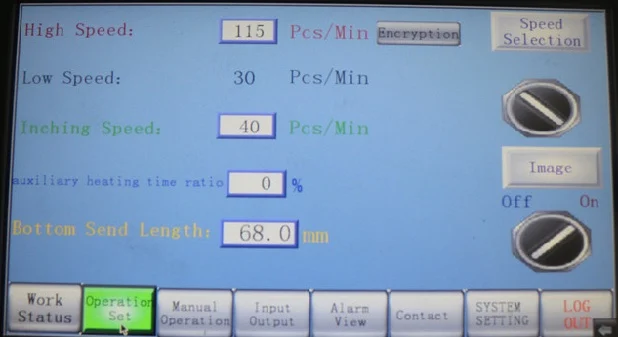
Define what the machine actually stores
Start with the electrical documentation and supplier instructions for the delivered machine. Identify whether product settings are stored as named recipes, individual HMI values, PLC data, drive parameters or a combination. Confirm which data survives a power interruption and which values are calculated, protected or downloaded separately. Do not assume that an HMI recipe contains every setting needed to recover the machine.
The HMI and PLC communication guide addresses connection failures. Recipe recovery is different: the screen may communicate normally while an incorrect or incomplete parameter set is loaded. Preserve the active values before any reset, software update or replacement work.
Create an approved recipe identity
Give each controlled recipe a product code, cup drawing revision, material and coating reference, mould or change-part identity, machine identity and approval date. Record related downstream settings only if their ownership is clear. A name such as “8 oz final” is not sufficient when several rim diameters, bottom constructions or printed blanks are used.
Link the recipe to a retained acceptable sample and the first-off inspection record. If a value changes, record who authorized it, the reason, the previous value and the evidence from the controlled trial. This supports the broader production change-control process and prevents a temporary fault-finding adjustment from becoming the undocumented standard.
Use a backup and recovery evidence table
| Control item | Record before backup | Recovery evidence |
|---|---|---|
| Machine and controls | Machine identity, controller type and displayed software revision | Backup belongs to the installed hardware and approved version |
| Product recipe | Recipe name, cup drawing, material, tooling and status | Loaded values match the released product record |
| Protected parameters | Supplier-controlled scope and access owner | No unauthorized engineering value was overwritten |
| Backup file | Date, operator, method, file name and checksum where used | File opens or imports by the documented method |
| Post-restore run | First-off sample plan and permitted trial stage | Motion, alarms and product checks pass before release |
Control access and removable media
Separate routine operator access from maintenance or engineering access. Passwords and protected supplier values should be managed under the factory’s security policy, not written into the recipe record or shared in photographs. If removable media is supported, use a controlled device, scan it under the site’s cybersecurity procedure and store the master backup away from the machine.
Keep at least one traceable working copy and one protected master according to the factory’s backup policy. File names should not be the only evidence of version. A simple register can record creation date, machine, product scope, file size, verification status and storage location without exposing credentials.
Back up after an approved stable run
Do not create the master record while the team is still adjusting a defect. First confirm utilities, material, tooling, guards and machine condition; then produce and inspect the defined sample. Export through the supplier-approved method or record values using the required service procedure. Where a full controller image is necessary, involve qualified controls personnel and preserve license or device-specific requirements.
Compare the exported item with the HMI record and mark superseded files clearly. Never delete the previous approved version merely because a new trial appears promising. The new recipe becomes the released version only after sample approval, documentation and the responsible person’s sign-off.
Investigate before restoring
A missing recipe, corrupted display, changed value or controller replacement can have different causes. Record the first symptom, alarm history, power event, maintenance activity, user access and current values. If the HMI has communication or storage faults, restoring repeatedly may overwrite useful evidence or load data into an unstable control system.
Use electrical isolation and the site’s lockout procedure before cabinet access or controller replacement. Only qualified personnel should handle PLC, HMI, drive or network work. Confirm compatibility with HANNAI or the relevant control supplier before loading a backup after hardware or software changes.
Restore in controlled stages
Record the current state even when it appears wrong. Confirm the selected backup’s machine, date, product, controller and approval status. Follow the documented import sequence, then compare critical displayed values before permitting motion. Do not restore one known value by loading an entire unknown project image.
After guards are secured, use the approved restart and low-risk trial sequence. Verify homing or reference behavior where applicable, device status, alarms, dry-cycle motion only when permitted, and then material trials. Compare the first-off cup with the approved drawing and retained sample. Check sealing, rim, base, dimensions, stacking and any downstream interface relevant to that product.
Audit the system periodically
A backup that has never been checked may be unreadable, incomplete or assigned to the wrong machine. At planned intervals, review the register, storage media, access ownership and the relationship between live recipe names and released product records. Test the documented recovery method in a safe maintenance context when the supplier procedure permits it; do not interrupt production merely to prove a backup.
Include backup review after an HMI, PLC, drive, battery, storage device, software or major tooling change. The goal is not to create many copies. It is to maintain one understandable recovery path with an approved source, an authorized owner and product evidence.
Frequently asked questions
Is an HMI screenshot a complete recipe backup?
Usually not. It can document visible values, but hidden data, PLC values, drive settings, calculated fields and software context may be outside the screen. Confirm the delivered system’s backup scope.
Should operators be allowed to edit every recipe value?
No. Access should match responsibility. Routine selection, supervised adjustment and protected engineering settings normally need different control levels defined by the factory and supplier.
Can a backup from another paper cup machine be loaded?
Do not assume compatibility, even for a similar model. Hardware, software, options, tooling and commissioning values can differ. Obtain supplier confirmation and compare the exact machine identity.
What should be sent when recipe recovery fails?
Provide the machine identity, controller and HMI details, displayed revision, first symptom, alarm history, recent work, backup register entry, relevant screenshots without passwords, and the product and tooling record.
Send the machine model, HMI and controller identification, product drawing, tooling record, first symptom and available backup evidence through our inquiry page. HANNAI can review the information against the delivered control configuration.