Paper cup machine maintenance USB control addresses a small object that can carry a large recovery or configuration risk. A USB device used for a backup, update or diagnostic export needs an identified purpose and owner.
Follow the site IT or OT media policy and the machine manufacturer instructions. Some controllers use specialized memory media or procedures; an ordinary USB device is not automatically a supported replacement or service tool.
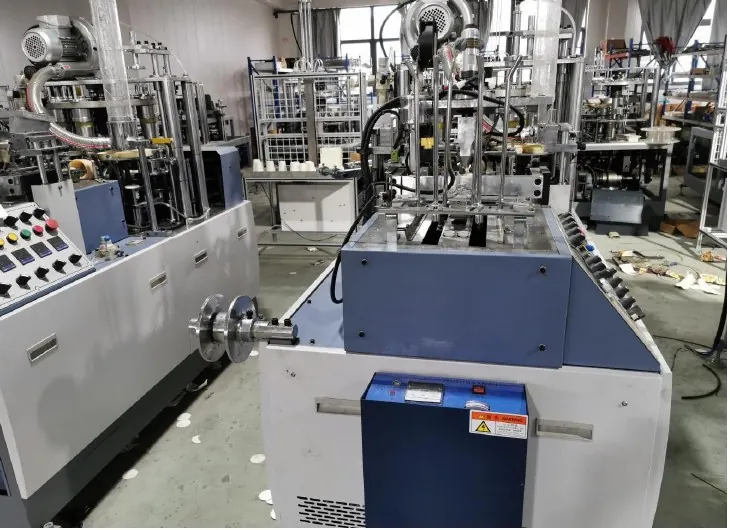
Decision worksheet
| Media check | Evidence | Decision before use |
|---|---|---|
| Device identity | Approved media ID and custodian | Known origin and permitted purpose |
| File identity | Package source, revision and applicability | Correct files for this machine |
| Preparation | Site-approved screening and handling record | No unresolved media concern |
| Closure | Transfer result and return to custody | No untracked files or active task |
Identify which transfers are actually permitted
List the service tasks that require removable media: exporting records, receiving an approved recovery package, transferring recipes or performing an authorized update. Confirm the supported media type, format and procedure from the installed device documentation. Different tasks may require different media and different qualified personnel.
Do not treat a visible port as an invitation to connect a general-purpose device. Ask whether the port is intended for the proposed task and whether machine state matters during insertion or removal. The answer should come from the supplier’s instructions, not from trial and error on a running line.
Keep approved media separate from casual storage
Assign approved devices an identity and custodian under the site policy. Use controlled storage and a record of issue and return. Avoid using the same device for unrelated personal files, office exchanges and controller maintenance. The goal is to know where the device came from and what it is carrying.
Have the IT or OT owner define appropriate preparation and screening methods. Do not add security software to a controller or reformat specialized media without authorization. Screening performed elsewhere does not prove a machine update package is compatible; media hygiene and functional suitability are separate checks.
Verify the package before transfer
Record the supplier source, file names, revision, target device and intended operation. Obtain a trusted integrity value where the supplier provides one, and compare it using the approved process. A matching file-integrity value can establish that the received copy matches the reference; it does not establish that the reference is right for this machine.
For example, two machines may have similar names but different control options. Confirm applicability to the serial number before importing a package. If a device contains several revisions, identify the approved one explicitly and avoid ambiguous selection during the service task.
Record the transfer without exposing sensitive information
Use a transfer record containing machine identity, operator or technician, media ID, purpose, package revision and observed result. Preserve relevant exports in approved storage. Do not place passwords, access tokens or unnecessary customer information in a shared service folder.
If an export is required for support, review its content and the agreed handover method with the site owner. The service record should state what was transferred and to whom it was authorized, without copying secrets into the log. Stop if unexpected files, unknown media or an unapproved operation appear.
Close the task and return media to controlled custody
Follow the device procedure for completing the operation and removing media where permitted. Confirm the machine’s normal state and retain the transfer evidence. If the task changed software or settings, perform the corresponding functional verification and update the recovery baseline after acceptance.
Return the device to its custodian and update its status. Do not leave a service device connected indefinitely unless the equipment procedure explicitly requires it. A complete media record joins origin, file applicability, authorized use and closure, making the next transfer easier to verify instead of relying on an unlabeled device in a toolbox.
Related equipment and next checks
Review the HN-M100 Automatic Paper Cup Machine and the related maintenance preparation and parts kitting. The Engineering Notes archive connects these checks with wider machine planning.
Technical reference
- NIST operational technology security publication — general policy reference — general reference; confirm applicability to the installed equipment.
Frequently asked questions
Can any USB device be used for maintenance?
Confirm supported media and the approved procedure for the installed controller or HMI.
Does a successful malware scan prove an update is correct?
No. Also verify package origin, revision and machine compatibility.
Should service passwords be stored on the USB device?
Follow the site credential policy and avoid placing secrets in shared transfer files or logs.
What if the package origin is unclear?
Hold the transfer and obtain a trusted package and applicability confirmation from the authorized supplier.
Review the evidence with HANNAI
Send the intended transfer task and device model without credentials. HANNAI can help clarify the supported media procedure and machine-specific file applicability questions.