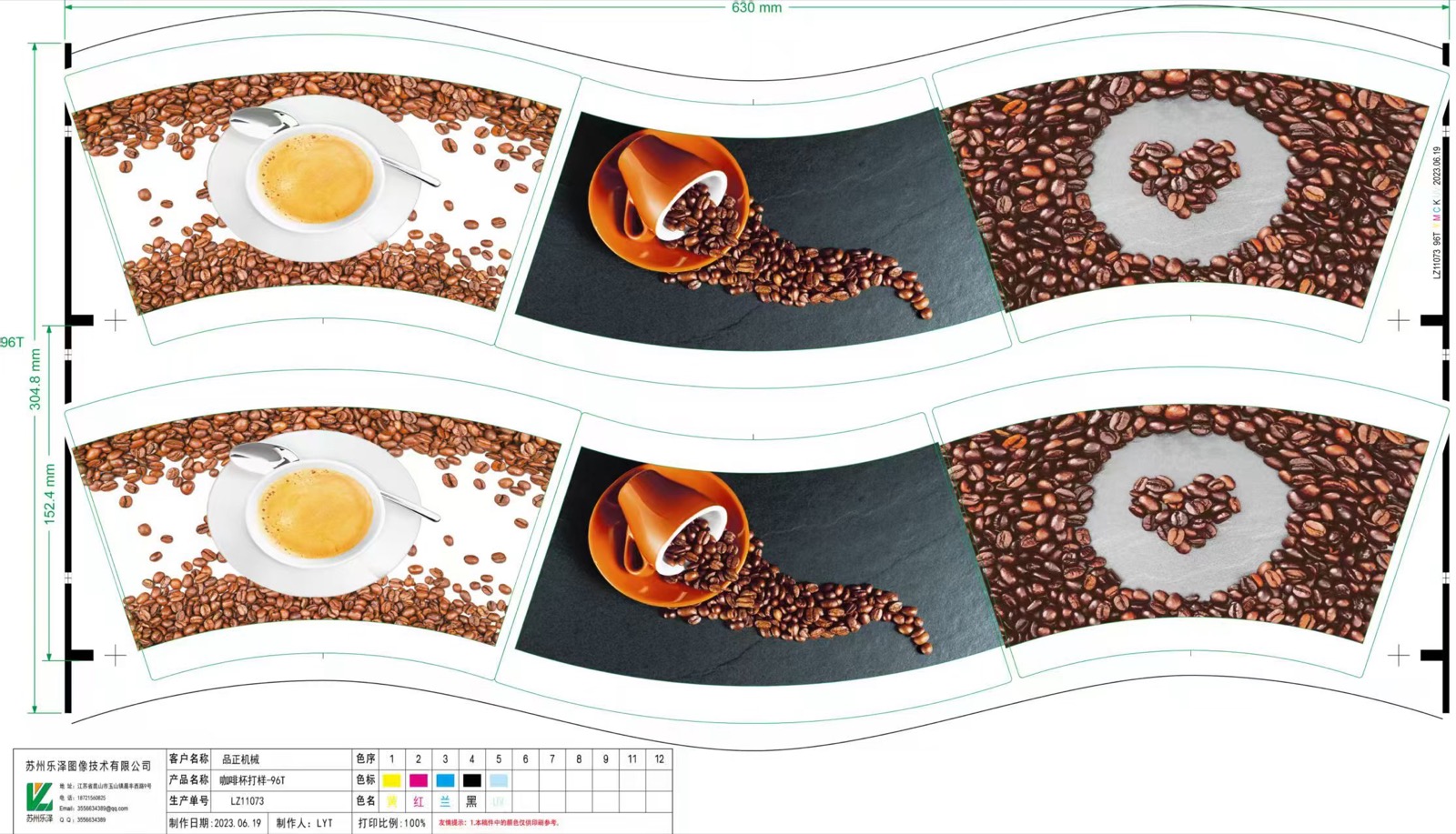
Paper cup artwork registration is a chain of approvals. The artwork must match the production dieline, printing must align with cutting, and the formed cup must present the design as intended. A flat proof can look correct while a logo ends up near the side seam or a graphic disappears into the rim. Approve each handoff with a traceable reference rather than relying on a final photograph alone.
Freeze the production dieline and artwork revision
Obtain the approved fan-blank drawing for the actual cup and tooling. Identify the printed face, cutting outline, seam overlap area and regions affected by bottom forming and rim curling. The responsible converter should define bleed, safe areas and registration requirements for its printing and cutting process. Do not derive production allowances from an unverified template.
Assign a revision reference to the artwork and dieline together. Record which files were approved, who approved them and which supplier will produce them. Separate display mockups from production files so a marketing image cannot accidentally become the manufacturing master.
The paper cup digital printing machine page provides equipment context. Printing capability and artwork acceptance must still be confirmed for your material, ink system and conversion route.
Inspect print-to-cut alignment on actual blanks
Check representative blanks against the approved drawing. Look at the relationship between the cut edge and the reference artwork, including areas close to the seam and top edge. Assess alignment at different positions in the print layout according to the converter's inspection plan. A single attractive blank does not demonstrate consistent registration across a production lot.
| Handoff | Approval question | Evidence to keep |
|---|---|---|
| Artwork to dieline | Are the correct revision and protected areas used? | Approved files and marked drawing |
| Printing to cutting | Is the graphic positioned correctly relative to cut edges? | Identified flat blanks and inspection records |
| Cutting to forming | Are blanks correctly oriented and geometrically approved? | Blank lot and drawing revision |
| Forming to visual release | Are the seam, rim and displayed design acceptable? | Formed-cup proof from the approved lot |
| Repeat order | Has any file, material or process changed? | Change record and required reapproval |
If alignment varies, ask whether the variation was present before cutting or introduced during conversion. Preserve flat samples before investigating the formed cup. This lets the printer, cutter and forming team compare the same evidence.
Approve the design on a formed cup
Use trial cups made from the identified production blanks. Inspect the seam, top curl and lower formed area alongside the main display panel. Check whether text remains readable and whether adjoining graphics meet as intended. Evaluate the cup in the orientation the customer will use, with any required sleeve or lid where relevant.
Color approval and registration approval are different tasks. Specify the agreed viewing conditions and reference for color assessment; do not treat a phone photograph as a controlled color standard. Likewise, correct registration does not prove ink or material suitability for the intended food-contact application. Obtain the required supplier documentation separately.
Use the fan blank inspection guide to connect artwork approval with physical blank condition. When seam presentation is the issue, compare the flat proof with the sidewall seam inspection record.
Give the next production order a clear reference
Keep an approved flat blank and a formed cup with their file revision, material lot and production record. Define which changes trigger a new proof: artwork edits, dieline changes, printing route, material or tooling. Reordering the same brand design does not remove the need to confirm the production reference.
Contact HANNAI with the cup drawing, artwork and intended conversion process when planning the line. Review the Products page for the forming and supporting equipment to discuss during configuration confirmation.
Frequently asked questions
Is a digital mockup enough for production approval?
It is useful for design discussion, but it does not prove actual print-to-cut registration or formed-cup appearance. Use physical production proofs.
Who should define bleed and safe areas?
The responsible printing and converting supplier should confirm them against the approved dieline and process. Avoid applying generic allowances without review.
Why retain both flat blanks and formed cups?
Flat blanks show artwork relative to cut geometry; formed cups show the effect of seam overlap and forming. Together they help locate the stage of a mismatch.
Does registration approval cover food-contact suitability?
No. Ink, coating and material compliance evidence must be handled through the applicable supplier documentation and approval process.